How We Host Firecrawl for SproutMe's Agents on Kubernetes

We recently published a tutorial on Firecrawl's blog about running Firecrawl on Kubernetes and putting it behind an MCP server. That post is the how-to. This one is the other half: what we run and why, and how our agents use it once it is up.
The short version is that one self-hosted Firecrawl serves several of our agents, and none of them may state a fact without a page behind it. Everything here runs in our dev and staging environments today.
One install for dev and staging
We run Firecrawl ourselves on managed Kubernetes, in its own namespace, as a single install shared by our dev and staging environments. A Firecrawl request carries its own URL and returns that page's content, so nothing inside it belongs to an environment. One install means one thing to run, update and pay for.
It has no public endpoint. Only our own services call it: the MCP tool server our agents use, and the data pipeline's website snapshots, which are still being added.
Firecrawl does one job for us: it fetches and renders pages. We did not set it up to use a model, so every model call in these flows happens on our side, where we can check the result.
The five parts
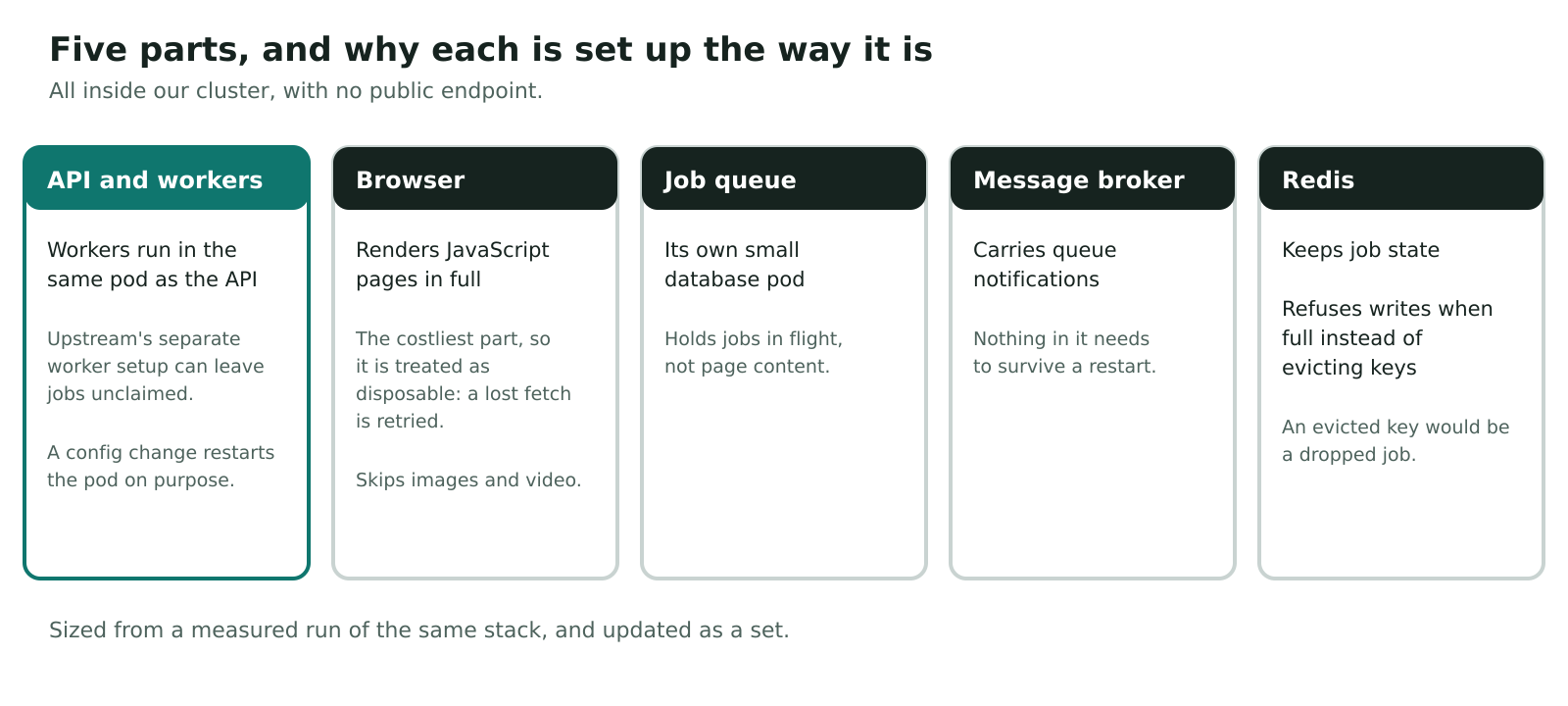
A Firecrawl install is five parts: the API with its queue workers, a browser that renders pages, a job queue, a message broker and Redis. We deploy them as plain Kubernetes resources, with no Helm chart.
The API, with its workers
The API is a Deployment, and the queue workers run inside the same container. Upstream's Kubernetes example splits the workers into a separate Deployment, but its worker command predates the current queue and would leave jobs unclaimed. Upstream's Docker Compose file runs them together, so we do too.
The pod has readiness and liveness checks. The API exposes its own health endpoints, so a check pointed at a route it does not have fails even when the service is healthy. Our configuration is hashed into the pod, so any change to it restarts the pod. That is what we want, because the workers read their settings only at startup.
The browser
Firecrawl's Playwright service renders the JavaScript pages. It is the part that costs the most to keep running, so we treat it as disposable. If it is lost, the queue retries the fetch, so we lose a few seconds and not a job.
We keep it lean in two ways. Images, fonts and video are skipped, because they are most of a page's bytes and none of its text. And webhooks to local targets are off, because nothing of ours that could receive one lives in the cluster.
The queue database
Firecrawl's job queue runs on an upstream Postgres image that carries its own schema and extensions. That did not suit our managed database, and the queue holds jobs in flight rather than page content, so we run it as its own small database pod with a volume.
RabbitMQ and Redis
RabbitMQ carries queue notifications between the API and the workers. Redis comes from our shared in-cluster setup and holds job state. We set it to refuse new writes when it is full, not to evict old keys. Firecrawl keeps job state in Redis, so an evicted key is a dropped job, not a cache miss.
Nothing in RabbitMQ or Redis needs to survive a restart, so neither is worth a managed instance.
Sized from measurements
We sized the install from a measured run of the same stack, not from guesses. Requests sit close to what we saw, because our platform bills what a pod requests, so over-sizing costs real money. The settings that depend on each other move together: change how many workers run, and the memory the API pod asks for has to move with it. How many pages are fetched at once is limited by the browser, not by the API.
We also keep logging quiet. Firecrawl can write a line for every fetch, and our log service bills for every line.
Keeping fetches on the public web
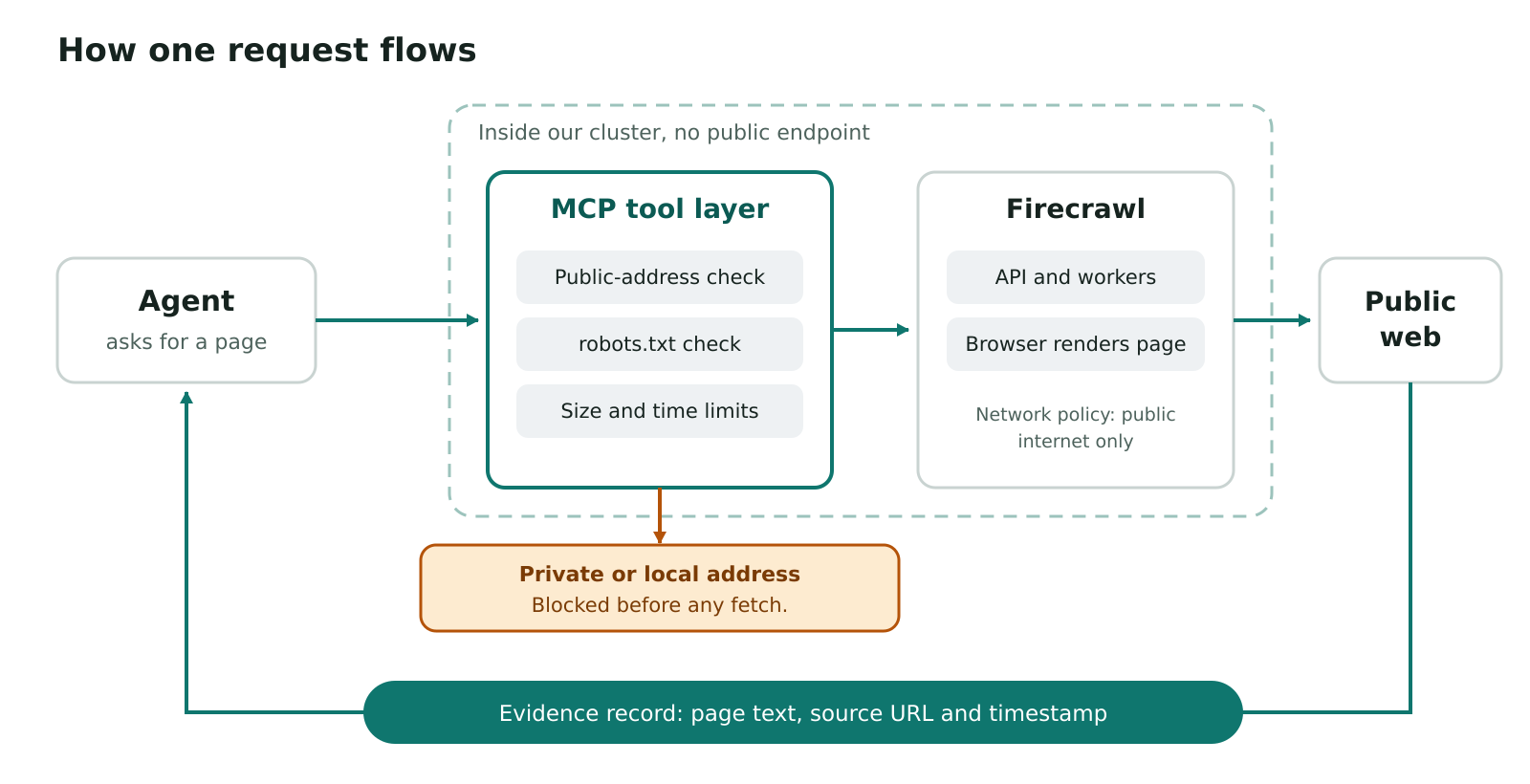
Because Firecrawl fetches whatever URL it is handed, who can ask and where a fetch may go both matter. The cluster network enforces both. Only approved services can call the API. The browser, the queue database and the message broker answer only Firecrawl's own pods. And the API and browser can reach the public internet and nothing private.
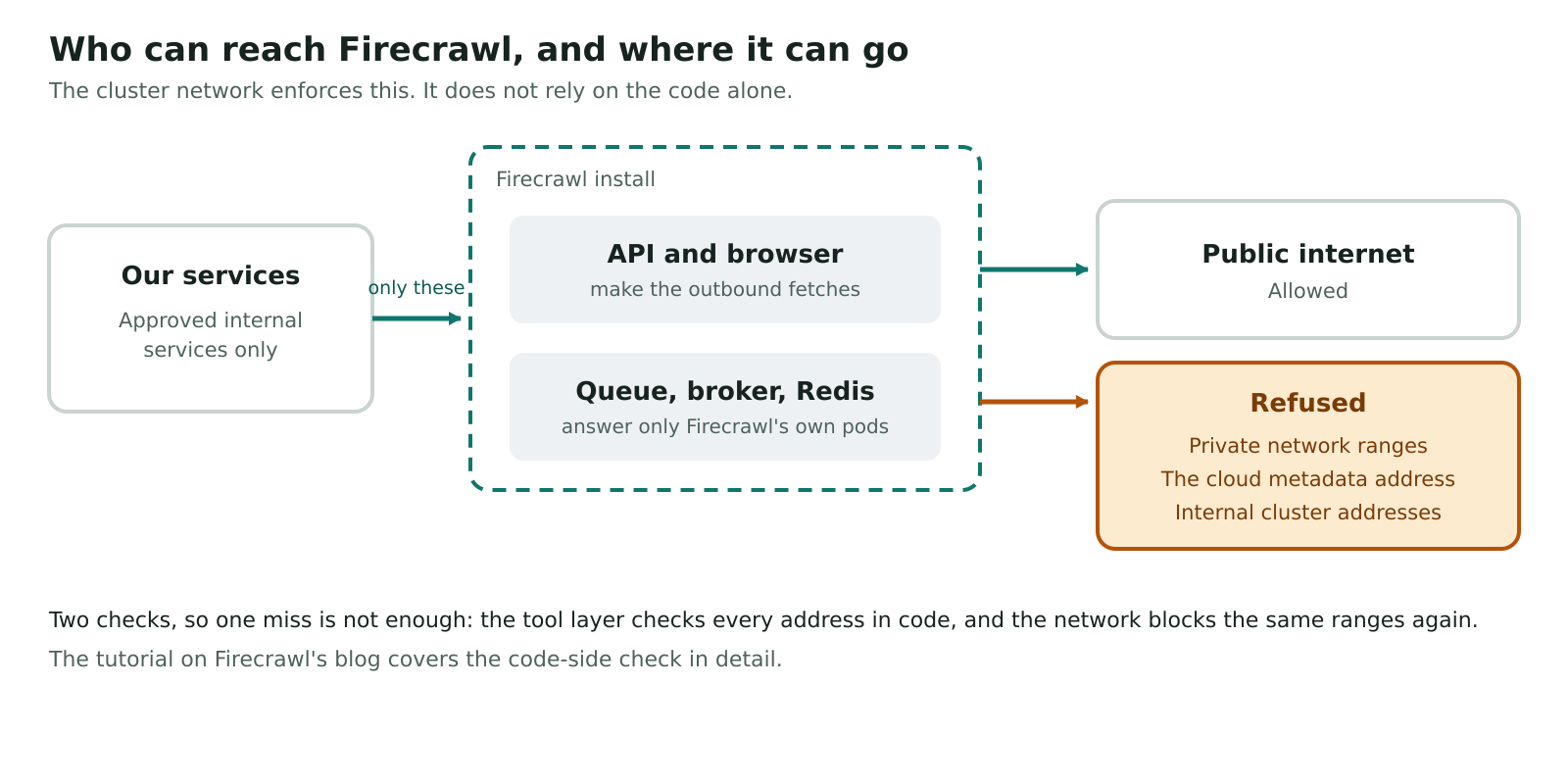
That is the second of two checks. The first is in code, in the tool layer, which checks every address before anything is fetched. The tutorial on Firecrawl's blog covers that check in detail.
Keeping it up to date
The Firecrawl images are pinned, and we update the three of them together. A rebuilt image upstream cannot change what runs in our cluster until we choose to update.
The tool layer on top
Agents never call Firecrawl directly. They call tools on our MCP server, which gives them a small set of web research tools: map a site, scrape a page, search for candidate pages, and render a page. A few more tools read a site's robots and structured data, and support audits. Search results are leads, not facts. An agent still has to read a page before it cites it.
Every tool follows one contract. A result carries its data plus its source and a timestamp. A failure is a typed error with a clear reason, never an empty success. An agent that gets "blocked" can tell the customer a page was not read. An agent that gets nothing can only guess what the page said.
The tools also respect each site's robots.txt, because Firecrawl's own scrape does not check it.
Grounding: every claim needs a source
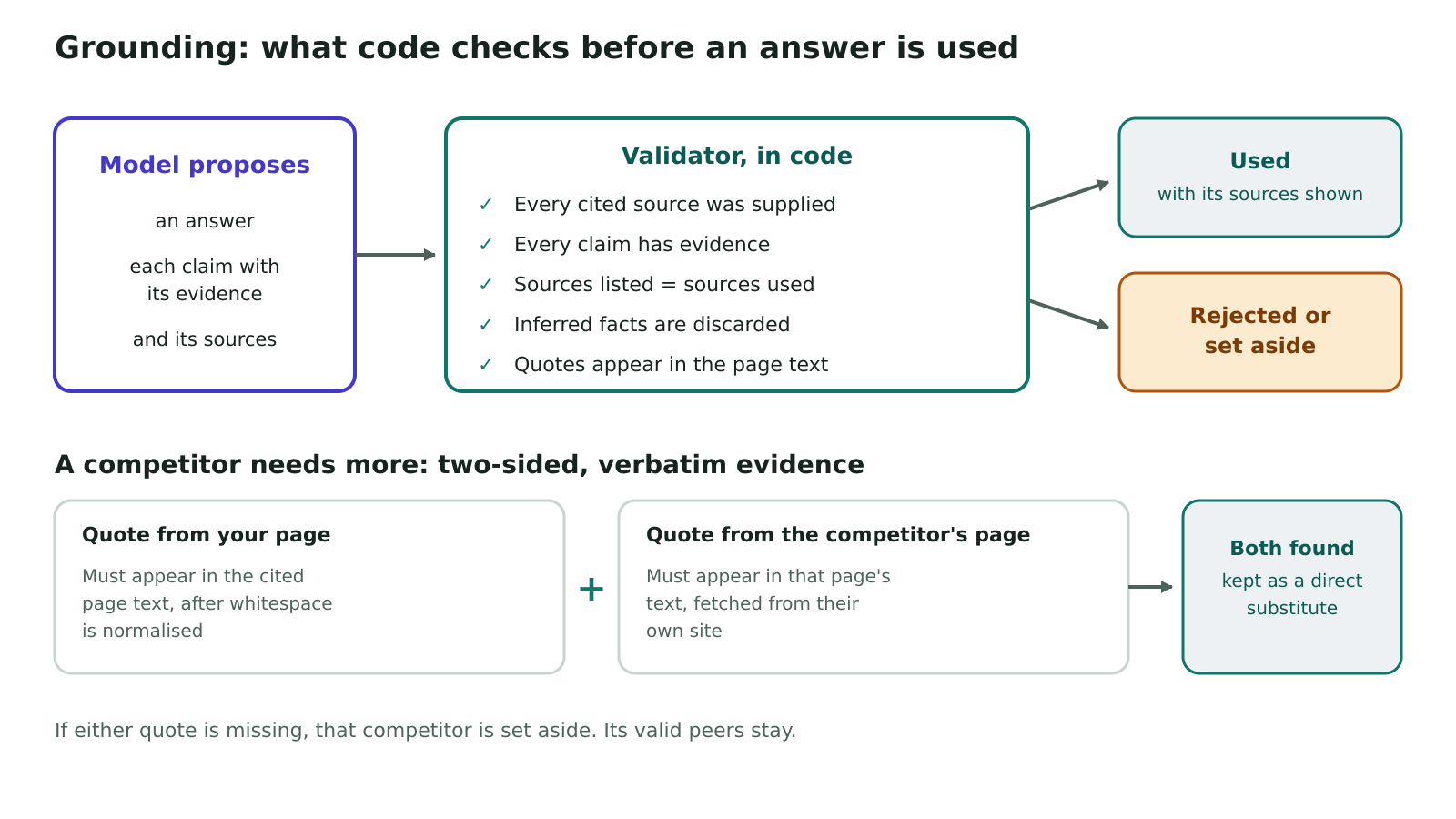
Whatever a model writes from the evidence is validated by code before it is used. Every claim must point to evidence. Every cited source must be one the collector actually supplied. Facts supported only by inference are dropped. The model never chooses or edits the sources: code attaches them. Before any model sees a page, sensitive text is redacted and the page text is capped in size.
When a model compares a competitor to the customer, the bar is higher. A direct substitute needs a quote from the customer's page and a quote from the competitor's page, and each quote must appear in the page text we read. A competitor whose evidence does not hold up is set aside, and its valid peers stay.
Audits that report what they could not read
Our research audits keep the same split between reading and interpreting. Code reads each site and returns evidence, with no model in the collection step. A tool that fails does not fail the audit. Its item says the evidence is insufficient and why, and the audit marks the affected measure as not assessed. A tool never reports a failure as a result.
The business's saved website and competitors are read once, at the start, so an edit made while the audit runs cannot give two steps different views of the same competitor.
What broke along the way
- A renamed Redis. When Redis moved to our shared setup, its pod name changed, but a network rule still allowed the old one. The API could no longer reach Redis, and scrapes never finished. Nothing reported a rule error. We now derive the names the rules depend on from one value.
- The workers. Splitting them from the API, as upstream's Kubernetes example does, left jobs unclaimed. Running them in the API pod fixed it.
- A health check on the wrong path. It failed against a healthy API, which has no such route.
Limits today
- Some sites block automated readers. When that happens, the scrape fails and the agent reports that the page was not read.
- Pages are public only. Anything behind a login is out of scope.
- All of this runs in dev and staging.
Frequently Asked Questions
One shared install for dev and staging, no public endpoint, and one place to enforce checks on every request. The hosted API is simpler if you do not need that.
Not here. We did not set it up to use a model. It fetches and renders, and every model call happens on our side where we can validate it.
The queue's upstream image carries its own schema and extensions, which did not suit our managed database. It holds jobs in flight, not page content, so a small pod with a volume is enough.
Code attaches the sources, and a validator rejects any cited source the collector did not supply. Competitor claims also need quotes that appear in the page text.
The tool raises a typed error, and the agent reports the gap. In an audit, the measure shows as not assessed, with the reason.
A fetcher is only useful if you can trust what it brings back. Hosting Firecrawl ourselves gave us one place to render JavaScript sites and one place to enforce limits, at a size we measured and not guessed. The evidence design on top gives every agent the same rules: code picks the pages, a model interprets them, and code checks the result before a customer sees it.



Get a complimentary audit to uncover AI opportunities hidden in your data.
Put these strategies to work